
영화진흥위원회 api
https://codebeautify.org/jsonviewer

퀵타입 (quicktype) : JSON 데이터의 데이터 모델 만들기


URL에는 위치 정보가 있음
URI 에는 위치 정보가 없는 URN이 존재


집합 과 배열의 혼합으로 구성
API

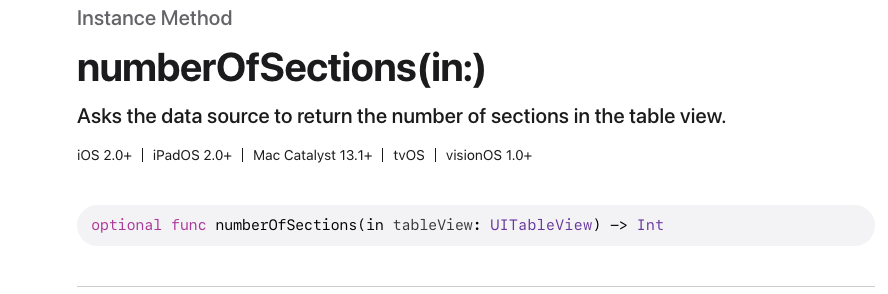
Optional형이라 필수 메서드가 아님

Optional이 없고 Required 가 있으면 반드시 구현해야하는 필수메서드임
//
//  ViewController.swift
//  movie_yjy
//
//  Created by 소프트웨어컴퓨터 on 2026/04/28.
//

import UIKit

class ViewController: UIViewController,UITableViewDelegate,UITableViewDataSource {
    @IBOutlet weak var table: UITableView!

    override func viewDidLoad() {
        super.viewDidLoad()
        table.delegate = self
        table.dataSource = self
    }

    func tableView(_ tableView: UITableView, numberOfRowsInSection section: Int) -> Int {
        return 10
    }

    func tableView(_ tableView: UITableView, cellForRowAt indexPath: IndexPath) -> UITableViewCell {
        let cell = UITableViewCell.init(style: .subtitle, reuseIdentifier: "myCell")
        cell.textLabel?.text = indexPath.description
        cell.detailTextLabel?.text = "\(indexPath.row)"
        return cell
    }
    func numberOfSections(in tableView: UITableView) -> Int {
        return 3
    }

}


자식 형으로 바뀐 것을 확인 가능함

//
//  ViewController.swift
//  movie_yjy
//
//  Created by 소프트웨어컴퓨터 on 2026/04/28.
//

import UIKit

let name = ["살목지","란 12.3","짱구","프로젝트 헤일메리","왕과 사는 남자","내 이름은","리 코로닌의 미이라",
"기동전사 건담: 섬광의 하사웨이 키르케의 마녀", " 르누아르","마녀배달부 키키"]
let audiAcc = [2025660,179528,2506504,16716939,140927,165682,30945,19744,1001,116644]


               class ViewController: UIViewController,UITableViewDelegate,UITableViewDataSource {
    @IBOutlet weak var table: UITableView!

    override func viewDidLoad() {
        super.viewDidLoad()
        table.delegate = self
        table.dataSource = self
    }

    func tableView(_ tableView: UITableView, numberOfRowsInSection section: Int) -> Int {
        return 10
    }

    func tableView(_ tableView: UITableView, cellForRowAt indexPath: IndexPath) -> UITableViewCell {
        let cell = tableView.dequeueReusableCell(withIdentifier: "myCell", for: indexPath)
        as! MyTableViewCell
        cell.movieName.text = "[\(indexPath.row+1)등]    " + name[indexPath.row]
        + " :  \(audiAcc[indexPath.row])명"
        print(indexPath,separator: " ",terminator: " ") //화면에 보이는 셀을 모두 만듦
        return cell
    }
    func numberOfSections(in tableView: UITableView) -> Int {
        return 3
    }
    func tableView(_ tableView: UITableView, didSelectRowAt indexPath: IndexPath) {
        print(indexPath.description) //어떤 섹션을 눌렀는지 확인 가능
    }

}
'iOS' 카테고리의 다른 글
| iOS_3grade - 11주차 (0) | 2026.05.19 |
|---|---|
| iOS_3grade - 10주차 (1) | 2026.05.12 |
| iOS_3grade - 7주차 (0) | 2026.04.14 |
| iOS_3grade - 6주차 (1) | 2026.04.07 |
| iOS_grade3 - 5주차 (0) | 2026.03.31 |


